


Thunder VPN - Fast, Safe VPN
4.866.13K Reviews
App Specs
- Version
- 5.4.4
- Updated On
- License
- Free
- Downloads
- 100,000,000+
- Developer
- Secure Signal Inc.
- Categories
- Tools
- Platform
- Android, iOS
Screenshots

 Analysis by AppCompare
I find VPN apps easiest to judge when I look beyond the connection button: can I understand what the app is doing, use it comfortably in ordinary situations, and tell whether its trade-offs suit my needs? Thunder VPN is a mobile tool from Secure Signal Inc. that keeps the basic task simple. That simplicity can be welcome if privacy tools feel intimidating, though a straightforward interface is not a substitute for checking whether a VPN fits the specific job you have in mind.
Readability and navigation in everyday use
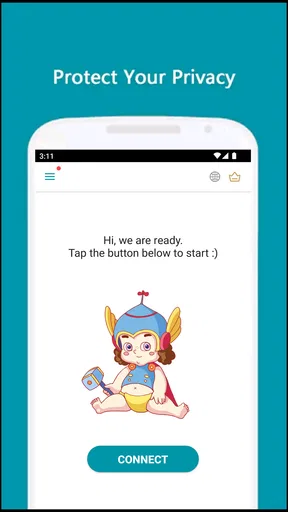
The first decision is refreshingly clear: connect, then get on with what you were doing. I like that a first-time user does not have to begin by sorting through a long list of technical choices. A VPN can be confusing when it introduces unfamiliar terms before explaining the basic action, so a minimal starting point lowers the barrier for someone who simply wants an extra layer between their device and a network.
That ease has a trade-off. If you want to compare locations, inspect connection details, or fine-tune behavior, a simple screen may leave you wanting more context. I would treat the connection control as an easy doorway, not as proof that every important privacy question has been answered. Before relying on any VPN for sensitive work, take time to read its current terms and understand what its controls actually do.
Motor and sensory considerations
A small number of clear actions can be helpful for people who prefer less visual clutter or who find multi-step setup tiring. The basic connect-and-browse workflow is also easier to remember than a process involving several configuration screens. I would still check the app on your own device: text size, contrast, touch targets, and compatibility with assistive settings can vary, and I would not assume a particular accessibility feature is present without seeing it.
Ads are part of the free experience, which may interrupt a task or draw attention away from the control you meant to use. If moving quickly through a screen matters to you, pause to make sure you have selected the intended option rather than tapping through an advertisement. This is a practical point for anyone using the app one-handed, in a hurry, or with limited tolerance for visual distractions.
Situational access: when a mobile VPN helps
I can see the appeal when you are joining public Wi-Fi at a café, hotel, or shared workspace and want your traffic to pass through a VPN connection. It can also be useful when you are moving between networks and would rather use one familiar mobile workflow than repeatedly adjust network settings. A VPN changes how your connection is routed; it does not make every website trustworthy or remove the need for careful account and device security.
For a realistic everyday example, imagine checking a travel booking while waiting for a train. You can connect before opening the site, complete the task, and disconnect afterward if you do not need the VPN continuously. That deliberate routine helps you notice whether the connection is active, while also avoiding the mistaken belief that a VPN alone protects passwords from phishing or makes a compromised device safe.
Worth Reading Before You Choose

Flipboard Shows What News Apps Must Do Beyond the Feed

Switching to Android Auto Means Rethinking Your Driving Routine

Google Calendar Makes a Crowded Week Easier to Manage

Ludo King Makes the Most of the Minutes Between Plans

Baby Panda World Brings Quick Play to Modern Phones, but Its Game Library Feels Busy

ESPN’s Live Game View Makes Following Close Games Easier
Thunder VPN sits in the Tools category and is free to install, with optional in-app purchases listed from $1.99 to $59.99 per item. The app is rated for Everyone and has been available since November 3, 2017. Its current version is 5.3.17, and it supports Android 6.0 and later. On the store, it has a 4.8 average from around 1.8 million ratings, with about 65,000 written reviews and more than 100 million installs. Those figures show broad use, but popularity alone cannot tell you whether its privacy practices, connection behavior, or interface suit your needs.
Trade-offs and alternatives to consider
Compared with a VPN that emphasizes detailed controls and transparent explanations, this app’s appeal is its low-friction mobile approach. That may be the better fit if you want to connect without learning a lot of network terminology. If you need a service for work, need to choose a precise location reliably, or want extensive control over how a connection behaves, compare alternatives on those points before settling on a simple option.
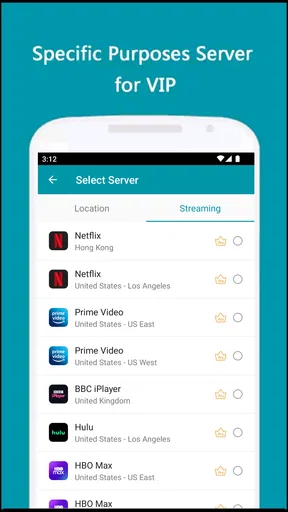
One useful habit is to decide what success means before connecting. If your goal is to protect traffic on a shared network, check that the VPN is active before you open the app or website you care about. If your goal is access to a particular region’s content, test that exact service rather than assuming a VPN connection guarantees it will work. Streaming platforms and other sites can detect or restrict VPN traffic, and connection speed can change with the network and destination.
I would also avoid treating a VPN as a replacement for secure browsing. Keep apps and the operating system updated, use strong unique passwords, and be wary of unexpected sign-in pages. A VPN can help with one part of a security routine, but it cannot correct a weak password or stop you from voluntarily entering details on a fraudulent page.
Remaining barriers and who may want another option
The free, uncomplicated approach is not ideal for everyone. Ads can be a nuisance, and the limited server selection described for the free version may not cover a location-specific need. If you require a desktop VPN, this mobile-focused app is not the right tool for that device. Likewise, anyone who needs detailed documentation or a service tailored to a regulated workplace should compare specialist options rather than assuming a general-purpose mobile app meets those requirements.
Before paying for an in-app purchase, I would check what the particular item unlocks and whether it addresses a problem I actually have. The listed range runs from $1.99 to $59.99 per item, so the presence of purchases does not by itself tell you which choice is useful. If the free version already covers occasional browsing, there may be no reason to spend; if you need a feature or capacity that is not available to you, compare the cost and terms with other services first.
People who want a quick mobile connection and do not mind an ad-supported experience are the clearest audience for this app. Someone who values extensive settings, a particular server destination, or use across desktop and mobile devices should look closely at alternatives. I would also advise anyone handling especially sensitive information to make a decision based on current, carefully reviewed privacy and security documentation, not on a reassuring interface or a high rating alone.
A clear, accessible starting point—with sensible limits
If you've been on the lookout for a fast and reliable VPN for your Android or iOS device, you might have stumbled upon Thunder VPN. This app promises a smooth and secure internet experience, so I decided to give it a whirl and see if it lives up to the hype.
First Impressions: A Simple Setup
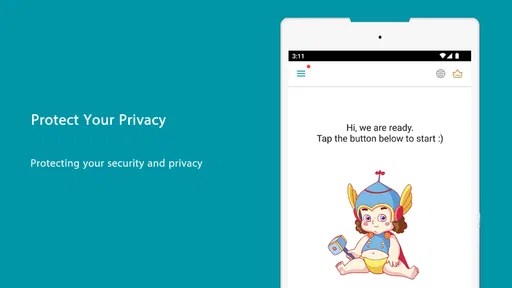
One thing that stands out about Thunder VPN is its simplicity. Setting it up is a breeze. After downloading the app, you’re only a tap away from connecting to a secure server. There’s no need to mess around with complicated settings, which is perfect if you’re not a tech wizard. Just tap that big connect button, and you're off to the races.
Performance: Fast and Furious?
Speed is everything when it comes to VPNs, and this app doesn’t disappoint. Once connected, I was able to stream videos, browse the web, and download files without experiencing any noticeable lag. It’s like my internet was wearing a superhero cape. This makes it an ideal choice for those who need a fast VPN for streaming or gaming.
But don’t take my word for it; the speeds are impressive, especially considering it’s a free app. Whether you're switching servers or just surfing, Thunder VPN handles it with grace.
Safety First: How Secure is It?
When it comes to privacy, the app uses industry-standard encryption protocols to ensure your data remains safe from prying eyes. It’s like having a bouncer at your digital door. This makes it a great option if you’re using public Wi-Fi or just want to keep your browsing habits private.
One thing that caught my attention was the app's no-log policy. According to their terms, they don’t keep track of what you’re doing online, which is a breath of fresh air in today’s data-driven world.
User Experience: Easy Peasy
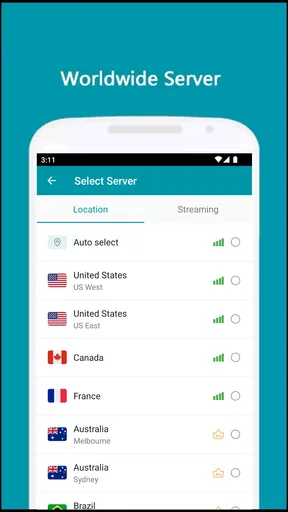
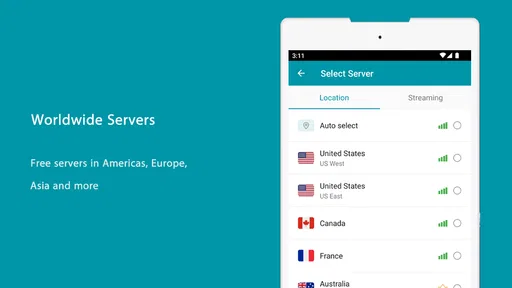
The interface is clean and straightforward. Even if you’ve never used a VPN before, you’ll find it intuitive. The app provides a list of servers, and switching between them is as easy as pie. Plus, there’s no need to sign up or log in. Just download, connect, and enjoy.
Advertisements do make an appearance, but they aren’t overly intrusive. It’s a small trade-off for a free service, and let’s be honest, we’ve all seen worse.
Limitations: What’s the Catch?
While Thunder VPN shines in many areas, it does have a few limitations. It’s primarily designed for mobile devices, so if you’re looking for a desktop solution, you might need to look elsewhere.
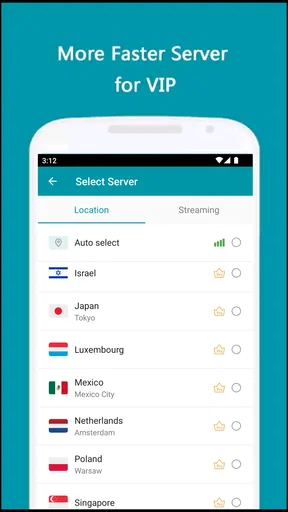
Additionally, the free version does have a limited number of servers. For casual users, this might not be a big deal, but if you’re looking for a specific region, it might be a bit restrictive.
Final Thoughts: Is It Worth the Download?
In a nutshell, Thunder VPN is a solid choice for anyone seeking a fast and secure VPN on their mobile device. Its ease of use, reliable speed, and security features make it a standout option for both beginners and seasoned VPN users.
If you’re okay with a few ads and don’t need a desktop solution, it’s definitely worth checking out. Plus, being free means you’ve got nothing to lose. So give it a whirl and see if it fits your needs!
Pros
- Fast connection speeds for streaming.
- Simple and intuitive user interface.
- Unlimited bandwidth with no restrictions.
- Reliable security features for privacy.
- No registration or login required.
Cons
- Limited server locations available.
- Ad-supported
- may interrupt usage.
- No advanced features for power users.
- Occasional connection drops reported.
- Less effective in high-censorship areas.
FAQs for Thunder VPN - Fast, Safe VPN
What platforms is Thunder VPN available on?
Thunder VPN is available for both Android and iOS devices. It offers a user-friendly interface on both platforms, ensuring that users can easily connect to a secure VPN network. You can download the app from the Google Play Store for Android devices and the App Store for iOS devices.
Is Thunder VPN free to use?
Yes, Thunder VPN offers a free version that provides basic VPN services. However, the free version may include ads and have limited server options. For users seeking an ad-free experience with more server choices, a premium version is available through in-app purchases.
How secure is Thunder VPN?
Thunder VPN uses high-level encryption to protect your data and ensure your online activities remain private. It hides your IP address and secures your internet connection, making it a reliable option for users looking to enhance their online privacy and security.
Does Thunder VPN have a data limit?
The free version of Thunder VPN may have some data limitations, which can restrict the amount of data you can use daily or monthly. To remove these limitations, users can opt for the premium version, which typically offers unlimited data usage.
Can I use Thunder VPN to access geo-restricted content?
Yes, Thunder VPN can help you access geo-restricted content by allowing you to connect to servers in different countries. This feature enables you to bypass regional restrictions and enjoy content from around the world, though the effectiveness may vary depending on the server availability and location.


